


Star Roam Sky Map Planet
4.31.36K Reviews
App Specs
- Version
- 1.5.1
- Updated On
- License
- Free
- Downloads
- 1,000,000+
- Developer
- Findout World Inc
- Categories
- Education
- Platform
- Android
Screenshots
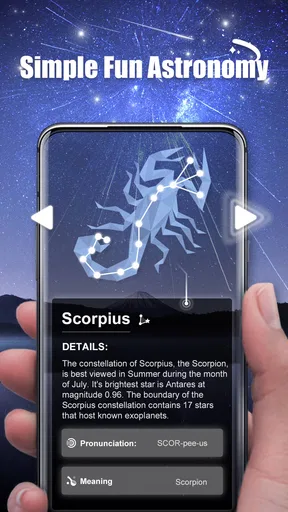
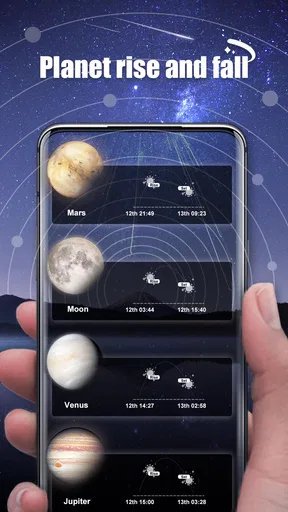
 Analysis by AppCompare
Sharing a sky map can turn an ordinary evening into a small family discovery, and that is where I see the strongest appeal of Star Roam Sky Map Planet. One person can point a phone toward the sky while everyone else follows along, asking what a bright point might be or which constellation they are seeing. The app is an education app from Findout World Inc, and its focus feels approachable: it gives curious beginners a way to connect what they see above them with names and explanations, rather than asking them to begin with astronomy jargon.
In a household, I would treat it as a shared activity rather than assume that everyone needs a separate account or personal setup. A parent, older sibling, or other adult can hold the phone and guide the view, then let children take turns deciding where to point it. That simple rotation works well when the device belongs to the household. It also keeps the session social: the screen becomes a reference for the group, not the whole event. I would still check who is holding the phone and what they are viewing, just as I would with any shared device.
A simple routine for a shared device
For a practical first outing, I would open the map indoors briefly, then step outside and let everyone take turns aiming the device. Starting with one visible object—a bright planet or a recognizable patch of stars—keeps the activity from turning into a race to identify everything at once. When a child asks a question, the educational information can give the group a natural next step: look at the object, read a little, then return to the sky and see what else is nearby.
That routine also helps with coordination. One person can manage the phone and explain the map while another keeps an eye on the children, coats, or the route back inside. If several people want to use the app, agreeing on turns is more useful than passing the phone around while everyone is moving. The view responds to the direction of the device, so a steady hand and a clear turn-taking plan make it easier for the group to follow what is on screen.
What the age label does—and does not—tell you
The app is rated for Everyone, which makes it a reasonable option to consider for a mixed-age household, especially when an adult is nearby to put what appears on screen into context. That rating is not a substitute for supervision or a promise that every child will find the material equally easy to understand. Younger children may enjoy pointing and spotting bright objects; older children may get more out of reading the explanations and asking follow-up questions.
I would also keep expectations grounded: a sky map can help make looking upward more engaging, but it does not replace the experience of seeing the real sky. Weather, light pollution, and the time of evening still shape what a family can observe. On a cloudy night, the app can still prompt curiosity or help with learning, but it cannot make the stars visible through clouds. If the goal is a structured astronomy course, a telescope guide, or a detailed observing plan, a dedicated resource may suit that purpose better.
Exploring the Universe from Your Backyard
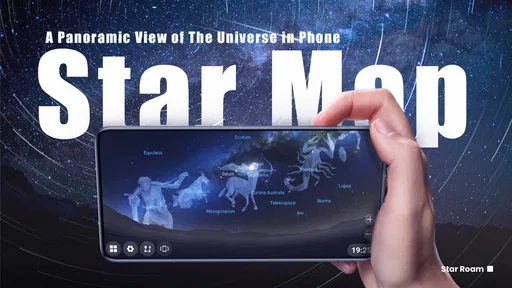
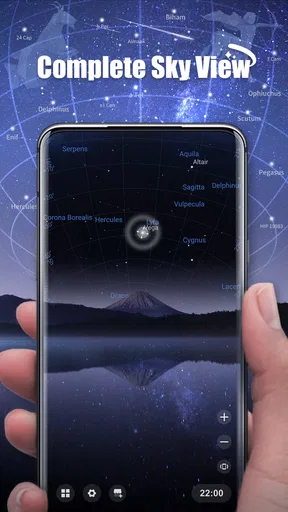
Right off the bat, Star Roam Sky Map Planet impressed me with its user-friendly interface. You don’t need to be an astrophysicist to navigate this app. The moment you open it, you’re greeted with a beautiful star map that shows your current location in relation to the celestial bodies overhead. It’s as simple as pointing your phone at the sky and letting the app work its magic.
Worth Reading Before You Choose

EA SPORTS FC Mobile 26 Is a Bigger Football Game, but It Takes Time

Flipboard Shows What News Apps Must Do Beyond the Feed

Switching to Android Auto Means Rethinking Your Driving Routine

Google Calendar Makes a Crowded Week Easier to Manage

Ludo King Makes the Most of the Minutes Between Plans

Baby Panda World Brings Quick Play to Modern Phones, but Its Game Library Feels Busy
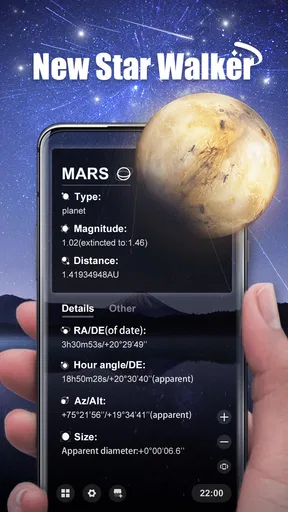
One of the coolest features is the real-time positioning. As you move your device, the map adjusts to show you exactly what’s above you. I found myself wandering around my yard, phone in hand, captivated by the sheer number of stars and constellations I could finally identify. The app even highlights major planets and provides fun facts about them. Did you know Jupiter has at least 79 moons? I didn’t either until I started using this app!
Features That Shine
What sets Star Roam apart from other sky map apps is its augmented reality (AR) capability. This feature overlays information directly onto your phone’s camera view, making it feel like the stars are practically in your lap. It’s an immersive experience that brings stargazing to a whole new level.
The app also has a neat calendar feature that alerts you to upcoming celestial events. From meteor showers to lunar eclipses, you’ll never miss a chance to witness these awe-inspiring occurrences again. I found this particularly helpful, as I tend to lose track of time and forget when these events are happening.
Learning and Sharing
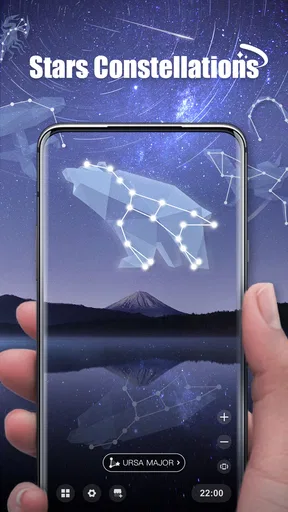
Star Roam doesn’t just show you where things are; it educates you. I enjoyed diving into the app’s extensive database, which provides detailed information on stars, planets, and constellations. Each entry is accompanied by stunning visuals and easy-to-understand explanations. For those of us who love to learn, it’s like having a mini astronomy class at your fingertips.
And if you’re the type who loves to share your newfound knowledge, the app makes it easy to capture and share your stargazing experiences. Whether it’s a photo of a rare planetary alignment or just a particularly clear night sky, you can save and share your discoveries with friends and family.
Getting more from a short session
A useful way to avoid aimless scrolling is to give each outing a small mission. I might pick one constellation to find, use the map to orient myself, then browse its entry only after I have looked at the actual stars. That order matters: reading first can make the screen feel like the activity, while looking up first keeps the app in the role of guide. For children, a simple challenge such as finding one bright object and describing its position can make the experience more memorable than trying to cover the whole sky.
The calendar can help turn a one-off look into a plan, but I would treat an alert as a reminder to check conditions, not as a guarantee of a good view. Before organizing a family evening around an event, consider clouds, local visibility, and whether everyone can stay outside comfortably. A quick look at the forecast and a backup indoor plan can prevent disappointment. The app’s event prompts are most useful when they lead to a realistic outing rather than a fixed promise that the sky will cooperate.
Choosing the right tool for the moment
Compared with a printed star chart or a general astronomy book, a phone-based sky map is more immediate: you can point the device and use its changing view to connect an explanation with the direction you are facing. A book can be easier on the eyes and better for sustained reading, while a printed chart avoids keeping a bright screen in front of you during dark adaptation. I see the app as a convenient bridge between those approaches, not a replacement for every astronomy resource.
It also differs from a telescope app or a formal observing guide. Those tools may be more useful when someone already has equipment, wants a planned observing list, or is learning how to conduct a focused session. Star Roam’s value is the quick recognition-and-learning loop: look, identify, read, and look again. If precise equipment guidance or a progressive course is the main need, I would choose a specialist resource instead of expecting a general sky map to provide it.
Comfort, spending, and practical limits
The app is free to download, with in-app purchases ranging from $0.99 to $69.99 per item. In a family setting, I would check the purchase controls on the device before handing it to a child, and agree in advance whether paid extras are off the table. That is a device-level precaution, not a special family feature I would assume the app provides. Its current version is 1.4.5, and it requires Android 10 or later, so an older Android phone may not be suitable.
There are practical trade-offs to phone-based observing. A bright display can make it harder to adjust your eyes to darkness, and holding a phone up for a long time can become uncomfortable. I would lower the screen brightness, keep sessions short, and take turns rather than leave one person responsible for aiming throughout the evening. Those small choices make the activity calmer and help the group spend more time looking at the sky than at the screen.
Star Roam has a 4.5 average from around 15,000 ratings, with about 1,300 written reviews, and it has passed one million installs. Those figures suggest that it has reached a broad audience, but they do not tell me whether it matches every household’s needs. I would recommend trying it if the aim is casual, shared learning and a more engaging way to identify what is overhead. I would skip it if the main requirement is a comprehensive astronomy curriculum, specialized observing support, or a screen-free activity.
Learning and Sharing
Star Roam doesn’t just show you where things are; it educates you. I enjoyed diving into the app’s extensive database, which provides detailed information on stars, planets, and constellations. Each entry is accompanied by stunning visuals and easy-to-understand explanations. For those of us who love to learn, it’s like having a mini astronomy class at your fingertips.
And if you’re the type who loves to share your newfound knowledge, the app makes it easy to capture and share your stargazing experiences. Whether it’s a photo of a rare planetary alignment or just a particularly clear night sky, you can save and share your discoveries with friends and family.
Wrapping Up the Night
After spending some time with Star Roam Sky Map Planet, I can confidently say it’s a must-have for anyone with even a passing interest in astronomy. It’s a fantastic tool for both seasoned stargazers and newbies alike. The combination of real-time tracking, educational content, and stunning visuals make it a standout app in the world of stargazing.
If you’re ready to take your love of the night sky to the next level, I highly recommend giving Star Roam a try. It’s like having a personal planetarium in your pocket, ready to guide you through the wonders of the universe whenever you’re ready to look up.
Pros
- Intuitive interface for easy navigation.
- Comprehensive celestial body database.
- Accurate real-time sky tracking.
- Offline mode for remote locations.
- Customizable viewing preferences.
Cons
- Occasional GPS inaccuracies.
- Limited free version features.
- High battery consumption.
- Ads can be intrusive.
- Lacks advanced stargazing tools.
FAQs for Star Roam Sky Map Planet
What devices are compatible with Star Roam Sky Map Planet?
Star Roam Sky Map Planet is designed to work on both Android and iOS devices. It requires Android version 5.0 or higher and iOS 11.0 or later. While it supports most smartphones and tablets, it’s always a good idea to check for device-specific requirements on the app's official download page.
Does Star Roam Sky Map Planet require an internet connection?
Star Roam Sky Map Planet primarily functions offline, allowing users to explore the night sky without needing an internet connection. However, for features like updates, news, or certain interactive content, an internet connection may be required. It's best to have occasional access to Wi-Fi or mobile data for a complete experience.
Are there any in-app purchases in Star Roam Sky Map Planet?
Yes, Star Roam Sky Map Planet offers in-app purchases. These can include premium features such as advanced star maps, detailed planetary information, or ad removal options. While the basic app is free, some users may opt for these enhancements to enrich their stargazing experience.
How accurate is the star data in Star Roam Sky Map Planet?
Star Roam Sky Map Planet uses data from reputable astronomical databases to provide accurate celestial information. It continually updates to ensure users have the most current and precise star maps. However, it's important to note that environmental factors, like light pollution, can affect visibility in real life.
Is Star Roam Sky Map Planet suitable for educational purposes?
Absolutely! Star Roam Sky Map Planet is an excellent tool for learning about astronomy. It offers detailed information on stars, constellations, and planets, making it suitable for both amateur stargazers and educational settings. Teachers and students can use it to complement astronomy lessons effectively.


